


Made to measure
A screen protector cut exactly to your screen
Tell us the size of your screen and we cut a protector to fit it edge to edge, in any of our films. It guards against scratches, smudges and knocks on laptops, tablets, monitors, car displays, industrial panels and anything else with a screen.
The builder above draws your protector to scale as you type and prices it straight away. You can enter measurements, upload a technical drawing, or reorder a design you have bought before.
Why cover a screen
What a screen protector is actually for
A protector is a consumable layer sitting between the world and a panel you would rather not replace. It is the cheapest part of the device and the only one designed to be thrown away.
The screen is the expensive part
A scratched or cracked panel on a monitor, a till, a tablet or an instrument costs far more to replace than a film, and on equipment that is in use all day it costs time as well. The film is the part you replace.
Scratches happen at desk height
Keys, rings, a stylus, a watch strap, grit caught in a cleaning cloth. A protector takes the marks that would otherwise be permanent, and comes off when it has had enough.
Knocks spread out instead of landing
Our Impact film is built in layers that diffuse the force of a blow, so a hard knock is less likely to reach the glass.
Glare, all day
Matte and Silk finishes scatter reflected light, which makes a screen readable by a window, on a shop floor or outdoors, and easier on the eyes over a long shift.
What is on the screen stays there
Privacy films black the display out from the side, so a card number, a patient record or a price list is only readable by the person in front of it.
Cleaning wears out a coating, not a screen
Screens wiped down between customers or patients lose their factory coating. A film takes the wiping, and a fresh one costs a fraction of the panel.
How to order
Three ways to order, all from the builder above

Enter measurements
For rectangles and circles. Type the width, height and corner radius in millimetres or inches, then add edge clearance, cutouts and your quantity.

Upload a drawing
For any other shape, or several parts at once. Upload an AI, PDF, EPS, SVG or DXF file and we read every part, its size and its holes, and price it for you.

Reorder a previous design
Ordering the same protector again? Enter the design reference from your order (it starts CC) and your design loads exactly as it was, ready to check or change.
Entering measurements, step by step
- 1Choose your filmEvery film shows its price for your size. Not sure? Open Help me choose.
- 2Enter your sizeWidth, height and corner radius, or a diameter for a circle. The drawing updates as you type.
- 3Add the detailsSet the edge clearance, and add cutouts, notches or corner cuts.
- 4Set your quantityBulk discounts show beside the quantity. Add an applicator kit if you would like one.
- 5Check and confirmRead the summary, tick to confirm your dimensions, and add it to your cart.
Before you order, the buttons under Add to Cart let you print a 1:1 template to check the fit, download a PDF quote, or copy a link to your design.
What we cut
Shapes the builder can cut
Start from a rectangle or a circle, then add what your screen needs. Everything below is drawn live in the builder as you type, so you can see the part before you order it.
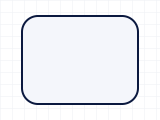 Rounded cornersOne radius on all four corners, measured in millimetres.
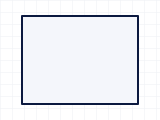 Square cornersNo curve at all. Enter a radius of 0 mm.
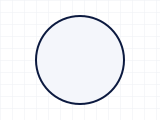 CircularRound dials, gauges and instrument faces. Enter the diameter.
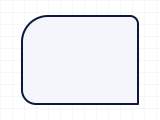 A radius per cornerCorners that differ: tick the box and measure all four.
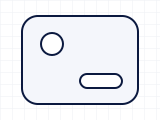 CutoutsUp to six circles, rectangles or slots for cameras, sensors and buttons.
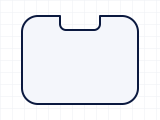 Edge notchA bite taken out of one edge, like the one on an older iPhone.
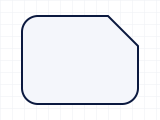 Corner cutA corner taken off square or at an angle, to clear a bracket or a clip.
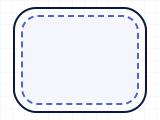 Edge clearanceThe cut pulled in from the screen edge, to clear a case lip or a curved edge.
Measuring guide
How to measure your screen
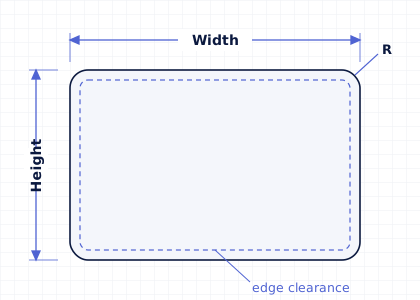
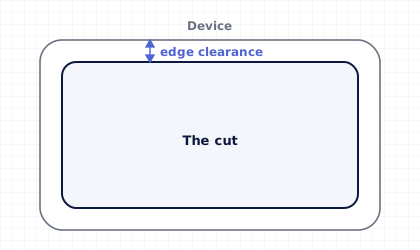
Edge clearance pulls the cut in from the screen edge, all the way round.
Width and height
Measure the area you want covered, edge to edge, with a ruler or calipers. Enter it in millimetres or switch the builder to inches; we convert inches for you and cut to the millimetre size shown in the check list. The diagonal appears as you type, so you can compare it with the screen size your device is sold as.
Only know the screen size?
Open I only know the screen size, enter the size in inches and pick the aspect ratio (16:9, 16:10, 3:2, 4:3 and more) and orientation. This gives the visible display area only; for edge-to-edge cover, measure the glass instead.
Corner radius
Measure the curve at the corners of the screen. Use our printable corner radius checker, a card or a coin, as shown in Find your corner radius below. Choose Circular for round parts and enter the diameter.
Edge clearance
Anything sitting over the edge of the screen can make a full-size protector lift: a case lip, a raised bezel or frame, a gasket, or a curved edge. Keep your screen measurements as they are, tick Leave a gap around the edges and choose 0.5 to 2 mm per side. We cut the protector that much smaller all round and show you the cut size.
Cutouts for cameras, sensors and buttons
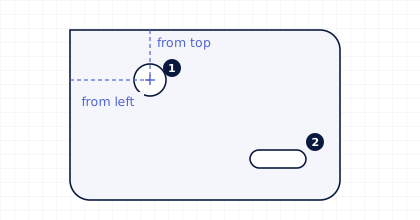
Add up to six circles, rectangles or slots. For each one, enter its size and the distance from the left and top edges to the centre of the cutout. Click a cutout on the drawing to see its measurements.
Keep each cutout at least 3 mm across, 3 mm inside the edge and 3 mm from any other cutout. The builder tells you straight away if one is too close.
Notches and corner cuts are different: they change the outline itself rather than making a hole. A notch takes a bite out of one edge, like the one at the top of an older iPhone. A corner cut takes the corner off square or at an angle, for a bracket, a screw or a clip. Add up to four, and we always leave at least 3 mm of material beside each one so nothing arrives with a tab thin enough to tear.
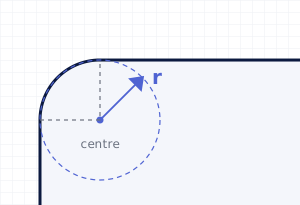
Find your corner radius
The corner radius is the size of the curve at each corner of the screen, in millimetres. A square corner is 0 mm. Getting it right stops the corners of the protector lifting or leaving a gap. If your screen's corners are not all the same, tick Different radius on each corner in the builder and measure each one.
Upload a drawing
Any shape, cut exactly to your outline
Preparing your file
- AI, PDF, EPS, SVG or DXF, up to 25 MB. DWG, STEP and IGES files cannot be read automatically, so please save them as DXF or PDF first.
- Draw each part as one closed outline at actual size. Shapes inside a part are cut out as holes.
- Dimension lines, text and labels are ignored. Photos and images cannot be used to cut from.
Reviewing your order
- We list every part with its size and price. Untick any shape you don't want cut, and change the drawing units if they look wrong.
- You order sets: one set is every part in your drawing, and bulk discounts count sets. A small handling fee is added once per drawing.
- Only our production team sees your file.
Our films
Eight films, one for every screen
Every film is available as a custom cut. Click a film in the table to read about it and compare its ratings with the others. Still unsure? Open Help me choose in the builder and answer three quick questions.
| Select a film to read about it |
 VividCrystal Clear VividCrystal Clear |
 ImpactShock Diffusion ImpactShock Diffusion |
 SilkRefined Finish SilkRefined Finish |
 MatteAnti-Glare MatteAnti-Glare |
 PaperPen-to-Paper Feel PaperPen-to-Paper Feel |
 Privacy30° Viewing Angle Privacy30° Viewing Angle |
 Privacy QuadPrivate from Every Side Privacy QuadPrivate from Every Side |
 Privacy Lite30° · Matte Finish Privacy Lite30° · Matte Finish |
|---|---|---|---|---|---|---|---|---|
| Technical information | ||||||||
| Surface finish | Glossy | Glossy | Satin | Matte | Paper | Glossy | Glossy | Matte |
| Material | PET | TPU | PET | PET | PET | PET | PET | PET |
| Surface hardness | 2H | 5H | 2H | 2H | 2H | 2H | 2H | 2H |
| Thickness | 0.13 mm | 0.347 mm | 0.125 mm | 0.123 mm | 0.135 mm | 0.394 mm | 0.48 mm | 0.299 mm |
| Privacy angle | None | None | None | None | None | 30° two-way | 30° four-way | 30° two-way |
| Visual | ||||||||
| Glare reduction | 0 out of 5 | 0 out of 5 | 2 out of 5 | 4.5 out of 5 | 4.5 out of 5 | 1 out of 5 | 1 out of 5 | 4.5 out of 5 |
| Image quality | 5 out of 5 | 5 out of 5 | 4.5 out of 5 | 4 out of 5 | 4 out of 5 | 3.5 out of 5 | 3 out of 5 | 3.5 out of 5 |
| Blue light filtering | 0 out of 5 | 0 out of 5 | 0 out of 5 | 0 out of 5 | 0 out of 5 | 3 out of 5 | 3 out of 5 | 3 out of 5 |
| Protection | ||||||||
| Smudge resistance | 1 out of 5 | 1 out of 5 | 2.5 out of 5 | 4.5 out of 5 | 4.5 out of 5 | 1 out of 5 | 1 out of 5 | 4.5 out of 5 |
| Scratch resistance | 3.5 out of 5 | 4.5 out of 5 | 3.5 out of 5 | 3 out of 5 | 3 out of 5 | 3.5 out of 5 | 3.5 out of 5 | 3 out of 5 |
| Shock protection | 2 out of 5 | 5 out of 5 | 2 out of 5 | 2 out of 5 | 2 out of 5 | 3 out of 5 | 3 out of 5 | 3 out of 5 |
| Interaction | ||||||||
| Touchscreen responsiveness | 5 out of 5 | 4.5 out of 5 | 5 out of 5 | 5 out of 5 | 5 out of 5 | 4.5 out of 5 | 4.5 out of 5 | 5 out of 5 |
| Fingerprint scanner compatibility | 5 out of 5 | 4 out of 5 | 4.5 out of 5 | 4.5 out of 5 | 4 out of 5 | 0 out of 5 | 0 out of 5 | 0 out of 5 |
| Stylus and pen use | 5 out of 5 | 3.5 out of 5 | 5 out of 5 | 5 out of 5 | 5 out of 5 | 3.5 out of 5 | 3 out of 5 | 4 out of 5 |
| Ease of cleaning | 5 out of 5 | 5 out of 5 | 4.5 out of 5 | 3.5 out of 5 | 3.5 out of 5 | 5 out of 5 | 5 out of 5 | 3.5 out of 5 |
See and feel a film before you order
A finish is easier to judge in your own hands than on a screen. Sample swatches are £1.30 each and come in every film we cut: Vivid, Impact, Silk, Matte, Paper, Privacy, Privacy Quad and Privacy Lite. Hold one against your device to compare glare, texture and clarity, then come back and order the cut.
Sample swatches are non-refundable and are excluded from promotions.
Order sample swatchesSwatch sizes
2 × 3 in5.08 × 7.62 cm
3 × 5 in7.62 × 12.7 cm
5 × 7 in12.7 × 17.78 cm
In the packet
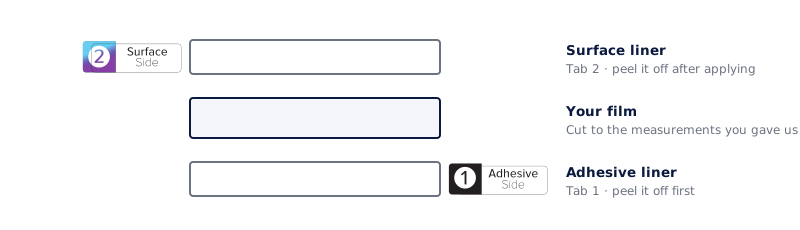
Two liners, two numbered tabs
Every film we cut arrives with a protective liner on both faces, so it reaches you unmarked. We stick a numbered pull tab on each one before it ships, because once a film is out of its sleeve the two sides are hard to tell apart. Tab 1 is the adhesive side and comes off first. Tab 2 is the surface side and comes off last.
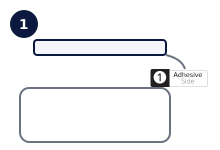 Peel tab 1Tab 1 is on the adhesive side. Pull it away and the sticky face is exposed: hold the film by its edges from here on.
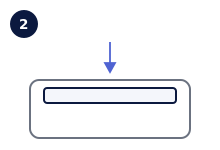 Line it up and lower itSet one edge down first and let the rest follow, so air is pushed out rather than trapped.
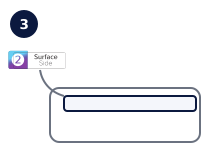 Peel tab 2Tab 2 is on the surface side. It stays on while you smooth the film down, then comes off to reveal the finish.
Work in a room with still air, wipe the screen first, and keep the film by its edges. If a speck of dust is trapped, lift the film back with tab 2 still attached, lift the dust off with a piece of sticky tape and lay it down again.
Sold separately
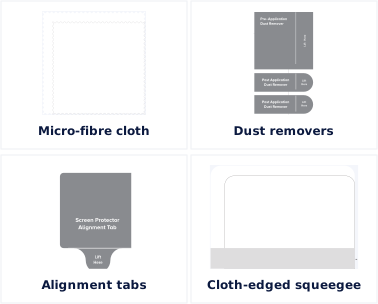
The Application Toolkit
A cut film is only as good as the fit, and most bad fits are dust rather than the film. The toolkit is the set we use ourselves: it is not included with your film and can be added to your order for £2.50.
- Micro-fibre cloth · Take the screen back to clean and dry before anything else happens.
- Dust removers · One for before, two for after: they lift what the cloth leaves behind.
- Alignment tabs · Hold the film in position over the screen while you commit to it.
- Cloth-edged squeegee · Push air out from the middle to the edges instead of chasing bubbles.
Application Toolkits are excluded from ongoing promotions.
Questions
Frequently asked questions
Can I enter my measurements in inches?
Yes. Switch the builder to inches and type as normal. We convert to millimetres, show both in your check list, and cut to the millimetre size.
Should I measure the whole glass or just the display?
Measure whatever you want covered. For edge-to-edge protection, measure the glass. If a case, bezel or frame overlaps the edge, keep the glass measurements and use Edge clearance, or measure just the flat area inside the bezel.
My screen isn't a rectangle or a circle. Can you still cut it?
Yes. Use Upload a drawing with an AI, PDF, EPS, SVG or DXF file and we cut exactly to your outline, including notches and holes. If you only have a photo or a sketch, our Bespoke service can draw it up for you.
How is the price worked out?
By film and size: the price steps up with the diagonal of the part (a circle is priced by its size). Each cutout adds a small amount, and bulk discounts apply as your quantity grows. The builder shows the exact price per piece, and the price on every film, before you add anything to your cart.
Can I use a discount code or promotion on a custom cut?
No. Custom cut screen protectors are made to order and are excluded from any ongoing promotions or discount codes. Bulk discounts still apply as your quantity grows, and the builder shows them beside the quantity.
Can I order several different sizes?
Yes. Add one design to your cart, then change the builder and add the next; each design is its own line with its own reference. If all your parts are in one drawing, upload it and order them together as a set.
Where do I find my design reference?
It is shown as Design Ref against the custom cut in your cart and on your order confirmation, and starts with CC. The builder also shows it when you add a design to your cart.
I need custom cuts for my business. Can you help?
Yes. We make custom cuts for schools, healthcare, fleets, retail and manufacturing. Download a PDF quote from the builder for your purchasing team, or contact our support team for larger orders.